Good keyword research is key for any winning search engine optimization (SEO) plan. It’s the first step in the SEO writing process. This step helps you learn the search terms your audience uses. When your content reflects these keywords, it becomes more visible online. This boosts your chances of being seen on search engine pages.
Knowing what your audience wants before you write content is crucial. This includes understanding what they look for using keywords on Google. It’s important to study keyword popularity and search volume. This data shows chances to use powerful long-tail keywords that match your goals and customer needs.
Also, looking at your competitors’ keyword strategies can be very enlightening. It lets you see what works for them. This knowledge helps in making your content better. It also guides you in finding ways to stand out from others in your market.
Key Takeaways
Keyword research is the groundwork for effective SEO and content strategy.
Knowing what your audience searches for is crucial for making content that stands out.
Examining keyword popularity, search volume, and competition can show important chances for improvement.
The right keyword research tools can greatly increase your list of keywords to target.
Choosing keywords wisely, based on search volume and how they align with your business, is vital for success.
What is Keyword Research?
Keyword research helps us find and look at the words people type into search engines. People do this to get info on topics, products, or services online, making it an essential part of marketing. This method shows us what words are popular, how hard they are to rank, and more.
Definition of Keyword Research
Keyword research is finding and analyzing the search terms people use. It’s about looking into what words and phrases are important to businesses. Then, these findings help with making better content, improving SEO, and marketing in general.
Importance of Keyword Research for SEO
Finding the right keywords is key for SEO success. It reveals what your audience looks for on platforms like Google. Understanding these terms lets you fine-tune your content and marketing plans. It helps you make content that fits their needs, making it easier to find.
Types of Search Intent
Keyword research highlights four types of search intent: informational, navigational, transactional, and commercial. Informational intent is for learning general info. Navigational helps find specific sites. Transactional is about making a purchase now. Commercial is for researching things to buy later.
How to Generate Keyword Ideas
Start by brainstorming keywords that fit your business and audience. Think about what topics your customers are curious about. This will be the first step in finding the right keywords.
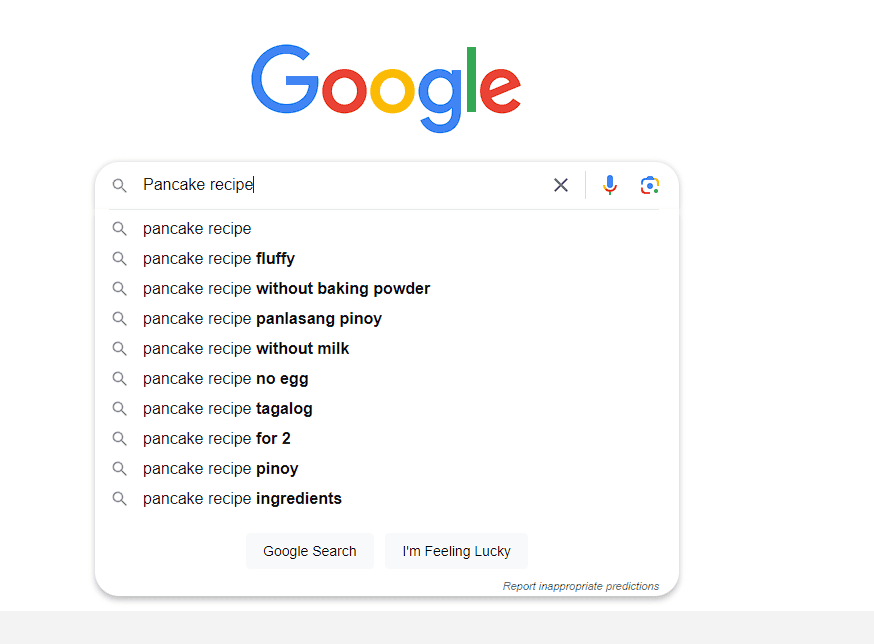
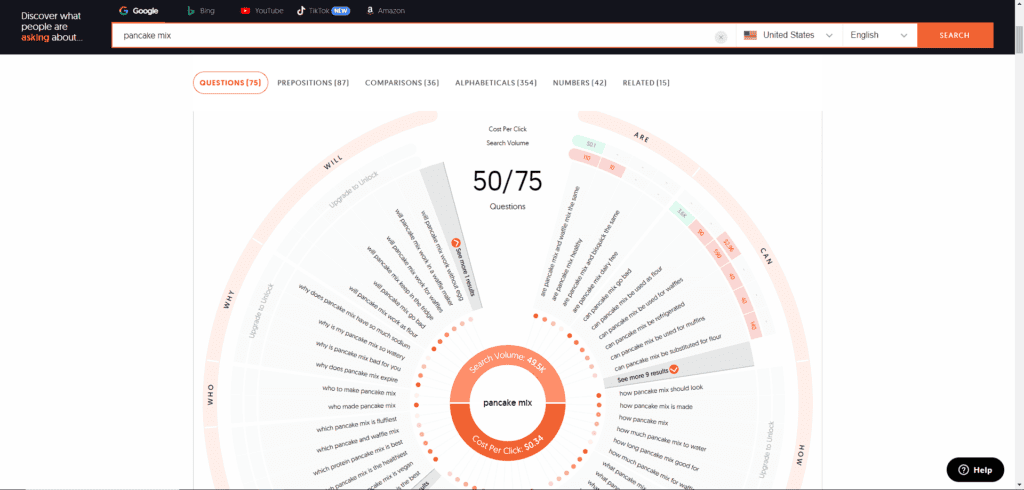
Tip: You can utilize Google’s autocomplete feature, ‘People Also Asked’ (PAA), and ‘Answer the Public’ to generate ideas. These tools can provide insights into popular search queries and topics, helping you better understand what information people are looking for.
Answer the Public
Explore Wikipedia Table of Contents
Check out the table of contents on Wikipedia. It’s a great way to find new keyword ideas. These subtopics can help with your SEO efforts.
Analyze Google’s Related Searches
The “Related Searches” in Google’s results can also help. They show what terms people often search. This is great for understanding your audience.
Leverage Reddit Discussions
Reddit is a treasure trove for keywords. Look for conversations in your industry. You’ll find keywords people use in real discussions.
Utilize Google and YouTube Suggest
Don’t forget about Google and YouTube’s autocomplete. They suggest keywords as you type. This can show you new, relevant long-tail keywords.
Investigate Online Forums
Online forums are another good place to look. They can show you how people in your field talk. This is crucial for keyword research.
Keyword Research Tools
Generating keyword ideas is possible on your own. However, SEO tools can greatly help. Ahrefs’ Keyword Explorer is a top choice. It gives in-depth data on search volume, keyword toughness, SERP analysis, and more. SEMrush is also excellent, with its Keyword Overview and Keyword Magic Tool for finding related keywords.
Ahrefs Keyword Explorer
Ahrefs’ Keyword Explorer is a top-notch research tool. It offers insights on search volume, keyword difficulty, and SERP analysis. This helps you spot the best keywords to focus on.
SEMrush Keyword Overview
The SEMrush Keyword Overview goes deep into keyword performance and competition. It looks at search volume, cost-per-click, and SERP features. This helps you see if targeting a certain term is worthwhile.
SEMrush Keyword Magic Tool
SEMrush’s Keyword Magic Tool is also handy. It finds many related keyword ideas. It uses search engine data to bring up unique, longer, or phrased differently terms.
Ubersuggest
Ubersuggest is a free tool for finding keywords and metrics. Although not at the depth of Ahrefs or SEMrush, it’s good for starting. Ubersuggest provides valuable initial keyword ideas and data.
These tools help you greatly build up your keyword list. They give insights for an effective SEO strategy. By using several tools, you get a wide range of keywords. This helps you optimize your content for a better search ranking.
Keyword Research Process
The has several important steps. First, set your and mission. This will make sure your keywords match your business goals and what your audience wants.
Define Your SEO Goals and Mission
Clearly state your like getting more traffic, leads, or sales. Knowing your main goals helps when you pick keywords to focus on.
Create an Initial Keyword List
Start with some you know and guess your customers are looking for. This list is the first step before you dig deeper into .
Research and Expand Your Keyword List
Use tricks and tools to make your initial bigger. Find new terms and long-tail keywords your audience might use. This makes your list more complete and diverse.
Analyze Keyword Search Volume and Competition
Now, it’s time to look at your full . Check out how often these words are searched and how hard it is to rank for them. This helps see which keywords are worth chasing after.
Prioritize Your Target Keywords
At last, pick your top based on their and . Also, consider how well they fit your business goals and what your customers are after. This guides where you put your SEO efforts first.
Tip: Don’t forget to include entities. If you want to learn more about entities, you can check our guide here.
Conclusion
Keyword research is key in SEO and content marketing. By knowing what your audience searches for, your content becomes more relevant and helpful.
Though it takes time, good keyword research is worth it. It leads to better visibility, more visitors, and higher conversion rates.
This guide shows how to build a strong keyword list. It also helps you create content that speaks to your ideal customers.
By mastering search engine marketing, you can improve your business’s SEO. The right keywords help your content meet users’ needs. Plus, they make you more visible in search results.
FAQ
What is keyword research?
Keyword research is about finding and analyzing what people type into search engines. The goal is to help with search engine optimization (SEO) or marketing.
Why is keyword research important for SEO?
Knowing which keywords to target is crucial for SEO. It gives insight into what your audience is looking for on Google. This info is key to shaping your content and marketing plans.
What are the main types of search intent?
There are four main types of search intent. They are: informational, navigational, transactional, and commercial.
How can I generate keyword ideas?
To get keyword ideas, start by brainstorming on relevant topics. Then, check out Wikipedia tables, Google related searches, Reddit discussions, Google Suggest, and YouTube Suggest.
What are some popular keyword research tools?
Common tools for keyword research include Ahrefs’ Keyword Explorer, SEMrush’s Keyword Overview and Magic Tool, and Ubersuggest.
What are the key steps in the keyword research process?
The main steps in keyword research are: 1) Setting your SEO goals, 2) List your initial keywords, 3) Expand on those keywords, 4) Check search volume and competition, and 5) Pick your main keywords.
Share this post
About the Author
Eli Gutilban
CEO & Founder of ArmaSEO
Leads ArmaSEO's service-first local SEO systems built to turn urgent "near me" searches into tracked calls for water mitigation and restoration companies.
Eli demonstrated a high level of professionalism throughout our collaboration. He was proactive in identifying issues and suggesting solutions. I would highly recommend Eli.
Contains information related to marketing campaigns of the user. These are shared with Google AdWords / Google Ads when the Google Ads and Google Analytics accounts are linked together.
90 days
__utma
ID used to identify users and sessions
2 years after last activity
__utmt
Used to monitor number of Google Analytics server requests
10 minutes
__utmb
Used to distinguish new sessions and visits. This cookie is set when the GA.js javascript library is loaded and there is no existing __utmb cookie. The cookie is updated every time data is sent to the Google Analytics server.
30 minutes after last activity
__utmc
Used only with old Urchin versions of Google Analytics and not with GA.js. Was used to distinguish between new sessions and visits at the end of a session.
End of session (browser)
__utmz
Contains information about the traffic source or campaign that directed user to the website. The cookie is set when the GA.js javascript is loaded and updated when data is sent to the Google Anaytics server
6 months after last activity
__utmv
Contains custom information set by the web developer via the _setCustomVar method in Google Analytics. This cookie is updated every time new data is sent to the Google Analytics server.
2 years after last activity
__utmx
Used to determine whether a user is included in an A / B or Multivariate test.
18 months
_ga
ID used to identify users
2 years
_gali
Used by Google Analytics to determine which links on a page are being clicked
30 seconds
_ga_
ID used to identify users
2 years
_gid
ID used to identify users for 24 hours after last activity
24 hours
_gat
Used to monitor number of Google Analytics server requests when using Google Tag Manager
1 minute
You can find more information in our Cookie Policy and .